
Tutorials
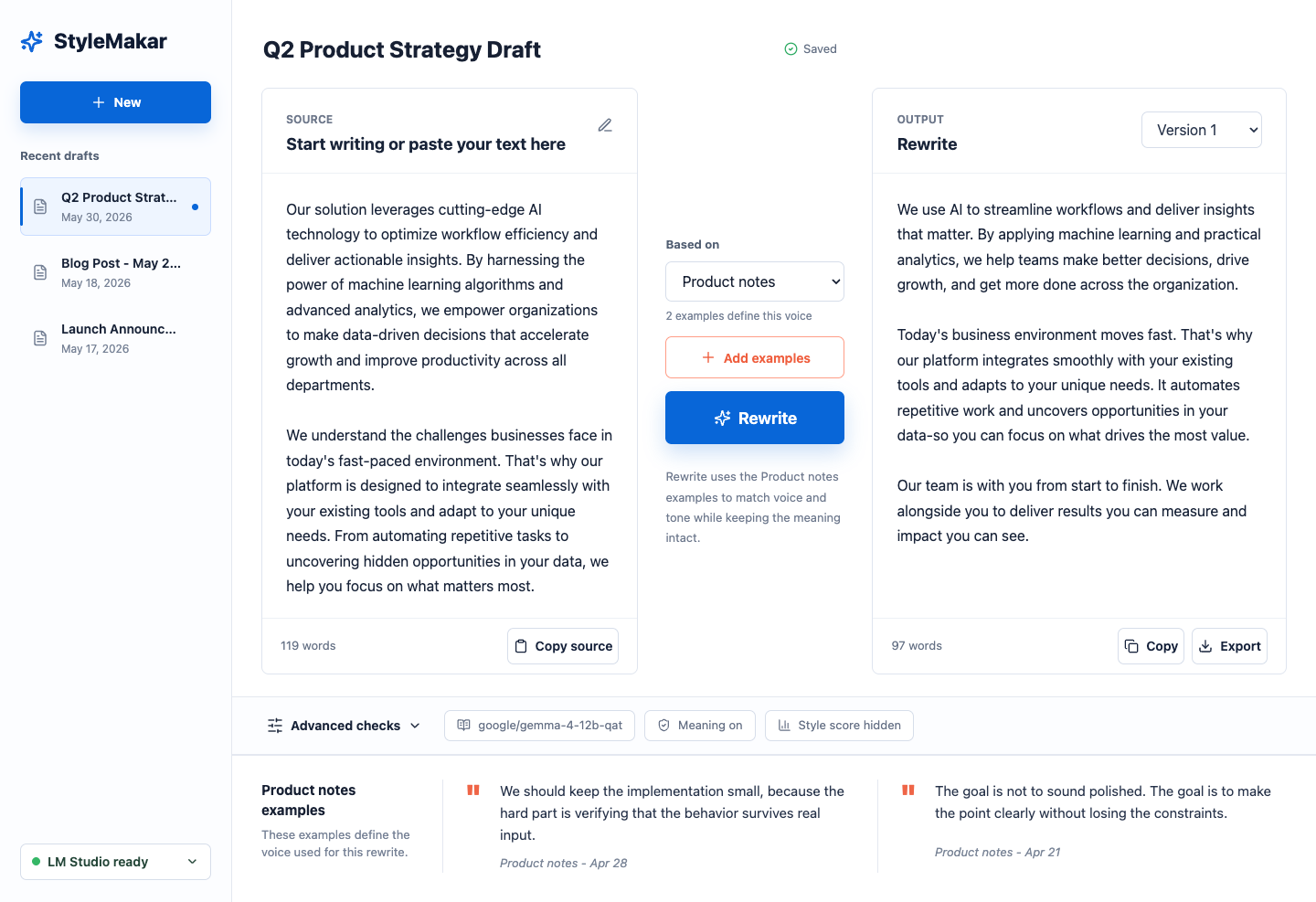
Rewrite Your First Draft
- Run
pnpm run dev. - Open
http://127.0.0.1:5173. - Confirm the provider pill says the model is ready.
- Select the seeded
Q2 Product Strategy Draftor paste new source text. - Keep
Product notesselected as the voice. - Click Rewrite.
- Copy or export the rewritten output.
Use The Mobile Layout
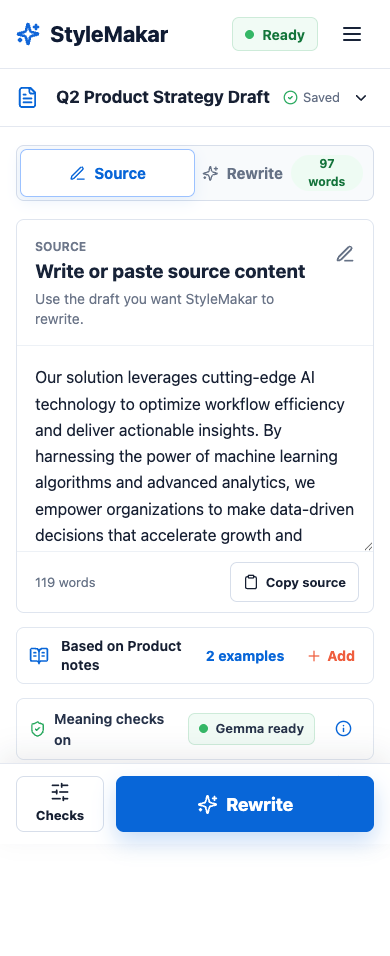
Resize the app below 720px or open it on a phone-sized viewport. The mobile shell splits the workflow into Source and Rewrite tabs with bottom actions for checks and rewriting.
Teach StyleMakar Your Voice
- Open Style Lab from the sidebar or the active voice row.
- Start Voice Coach.
- Choose which of the two blinded versions sounds more like you. You can also select tie, neither, or write your own version.
- Review every inferred preference before saving it.
- With a compatible provider connected, run the blinded comparison between the prior and proposed voices.
- Use Fine-tune my voice later to focus on directness, warmth, formality, concision, sentence rhythm, vocabulary, or explanation structure.
The curated coach works offline. Adaptive examples are optional and pass a meaning check before appearing. StyleMakar stores calibration evidence with the local voice profile and never activates an inferred preference before review.
When you substantially edit and accept a rewrite, StyleMakar may suggest a specific preference based on that edit. The voice changes only if you choose Save preference.
Call The Rewrite API
Run the development API:
pnpm run devSend a rewrite request:
curl -X POST http://127.0.0.1:5174/api/rewrite \
  -H 'Content-Type: application/json' \
  --data '{
    "document": "Our platform leverages advanced AI to improve workflows.",
    "options": {
      "includeDebug": true
    }
  }'
Use provider.baseUrl, provider.model, and provider.reasoningEffort when you want to override the default LM Studio settings. See Provider Setup for LM Studio and OpenAI-compatible provider requirements.
Run A Focused Eval
The eval harness seeds local fixtures and calls the real rewrite pipeline.
pnpm eval:smokeFor iteration comparisons:
pnpm eval:iterationsFor the full matrix:
pnpm eval:iterations:matrixValidate the curated personalisation contract:
pnpm eval:personalisationEval results are written under ignored evals/results/. Use STYLEMAKAR_EVAL_BASE_URL, STYLEMAKAR_EVAL_PROVIDER_ID, STYLEMAKAR_EVAL_CASE_FILTER, STYLEMAKAR_EVAL_MODEL, and STYLEMAKAR_EVAL_REASONING_EFFORT to keep iteration runs targeted.
Capture Updated Docs Screenshots
Start the app, then capture fresh screenshots from the seeded workspace:
pnpm run devSave source screenshots under:
docs/public/screenshots/VitePress serves those files from /screenshots/<filename>.